Run your concrete deliveries from one simple screen.
Take the order, put it on a truck, watch it go out, and see what it made you — without the whiteboard, the diary and the stack of phones.
Quick enough to use while the customer's still on the phone.
No training day. If they can text, they can use it.
Your information is private to your business. Full stop.
Everything that lives on the whiteboard — in one place
Sixteen everyday things, handled. Nothing you need a manual for.
A whiteboard that thinks
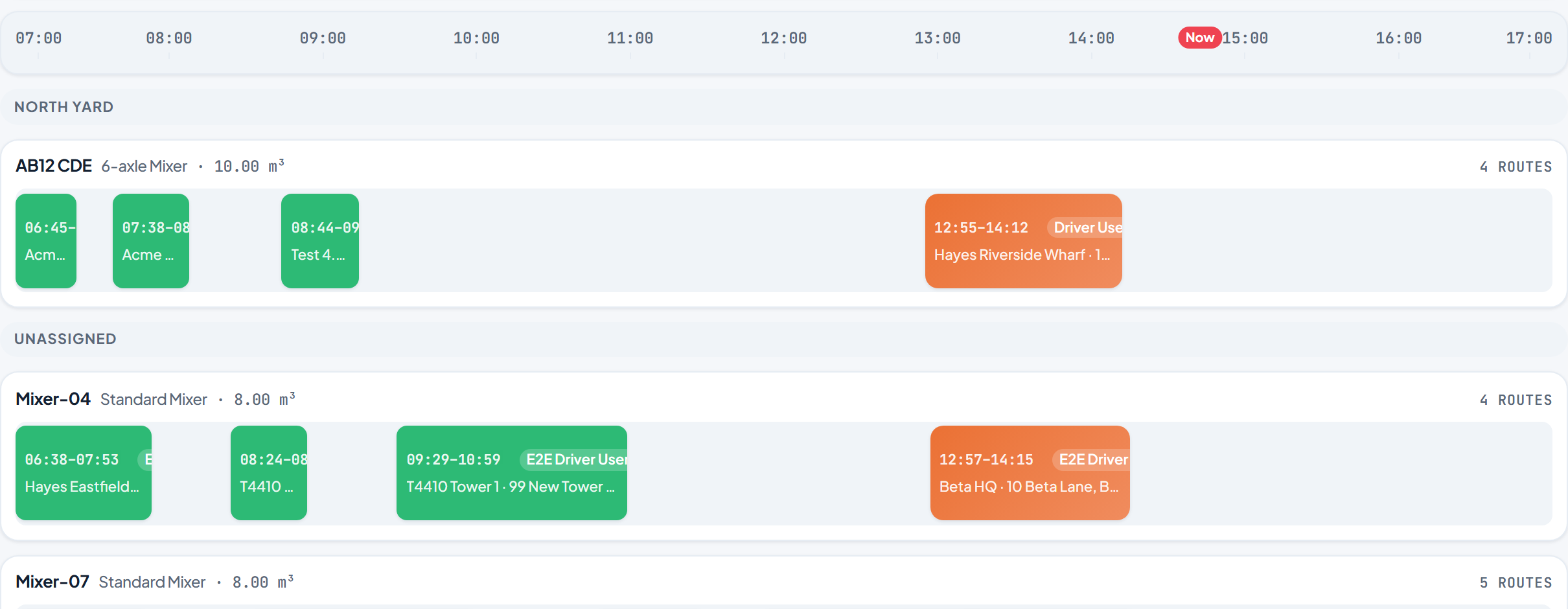
Drag jobs onto trucks and times. Your whole day, laid out — no more diary, wall planner and three phones.
See every truck live
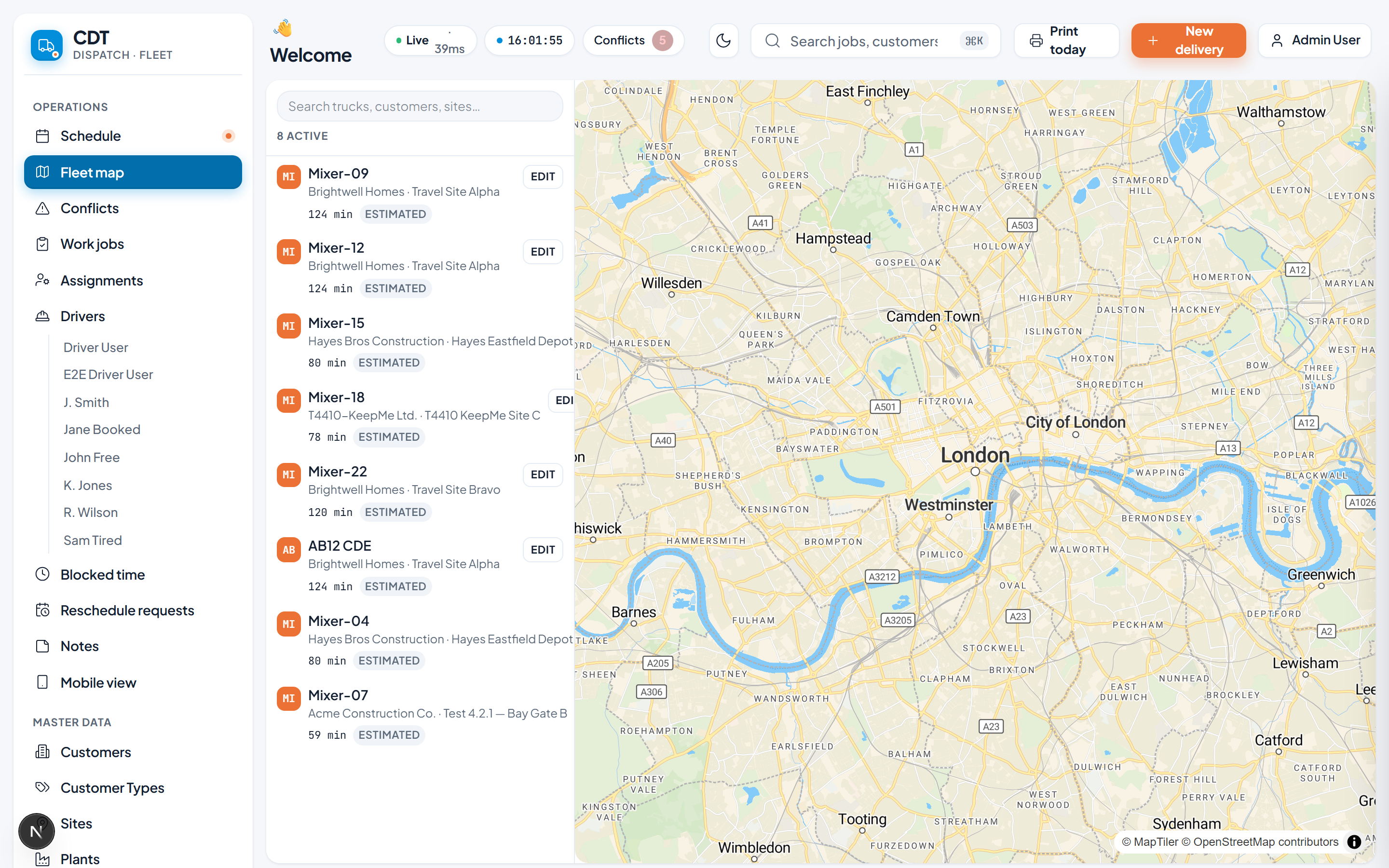
A map showing who's loaded, who's on the road and who's heading back. Answer 'where's my concrete?' in two seconds.
Jobs on the driver's phone
Drivers get each delivery on the phone they already own — address, mix, amount — and tap when it's poured.
Every order in one place
Take an order in seconds. Who, how much, what mix, where. The new lad can do it right on day one.
Profit on every load
It works out what each delivery actually made — after the mix, the diesel and the driver. Know your good jobs.
Catch clashes early
Booked the same mixer twice? It flags it in red before a customer's left standing on site.
Your customer book
Every customer and site in one tidy place, so nothing lives only in someone's head or a tatty notebook.
Reports without spreadsheets
Last month's tonnage for the accountant? Pull it up and print it. No Sunday-night spreadsheet wrestling.
Your plants & yards
Run it across one yard or several. Each plant's deliveries kept straight, all in the same screen.
Client performance dashboard
Charts of SLA compliance, on-time delivery rate and volumes — ready to share with the customer straight from their portal.
Customer portal
A branded self-service portal where your customers see their orders, invoices and delivery history — and e-sign off jobs without a phone call.
Quote accepted? Job booked.
When a customer e-signs a quote it turns straight into a scheduled delivery — no copying details across, no risk of it getting lost.
Your day on one screen
An overview dashboard showing today's and this week's deliveries, what's overdue or still unassigned, and how loaded each truck and driver is.
Overdue invoices chase themselves
Staged reminders go out automatically on unpaid invoices, so you spend less time ringing round for money you're already owed.
Fields you define
Add your own fields to customers, sites, orders and more — and edit them right there on the record, no setup screens to hunt through.
Nothing slips through
A notification bell flags mentions and updates, with an optional daily email summary so you stay on top of what's changed.
Everything it can do
Standard covers your day-to-day dispatch. Items marked Pro add live tracking, the money side (costing & invoicing), customer-facing tools and automation.
Operations
- Drag-and-drop scheduling
Plan every truck's day on one live board.
- Work jobs & deliveries
Create, edit and reschedule deliveries.
- Truck & driver assignments
Daily shift assignments per truck.
- Blocked time
Mark trucks/drivers unavailable.
- Driver app (PWA)
Drivers see their runs and capture delivery on a phone.
- Customers, sites, plants, trucks, mixes
All your master data in one place.
- Bulk operations
Reschedule/confirm many jobs at once.
- Kanban board viewPro
View and manage Work Jobs as a Kanban board with status columns, drag-to-update, and operative/round swimlanes.
- Rich notes & comments
Threaded replies, emoji reactions, @mentions, rich text, attachments, and pinning on notes across every record.
- In-app notifications
Staff bell + unread centre with mention, reply, reaction and thread-activity alerts.
- Mix price revisions
Immutable price history for mix types and customer rates — past jobs invoice against the price effective when they were booked, and you can view every price change.
- Edit lock
Prevents two people editing the same job at once — the second gets a read-only "X is editing" view until the first closes or a short timeout passes.
- Site access & keys
Store encrypted alarm codes, key-safe codes, gate codes and access notes per site. Codes are encrypted at rest (AES-256-GCM).
- WhatsApp notificationsPro
Send customer and operative notifications via WhatsApp as a selectable channel alongside email/SMS.
- Before/after photosPro
Operatives capture room-condition photos before and after each cleaning visit.
- Subcontractor invoicesPro
Subcontractors submit their own invoices; office reviews, approves, and batches them into payment runs.
- Dunning / aged-debtPro
Automatic reminders for overdue invoices, aged-debt reporting, and Direct-Debit-failure retry.
- Payroll / RTIPro
Run UK payroll via an integrated provider — PAYE/NI, RTI filing, payslips, and BACS export.
- Asset registerPro
Customer-asset register with service-due tracking.
- Asset PPM (planned maintenance)Pro
Auto-generate service visits when customer assets fall due.
- Field capture formsPro
Typed inspection, reading and survey forms captured on the job — with pass/fail thresholds and photos.
- Regulated certificatesPro
Issue numbered, retained, immutable certificates (CP12 and more) from a completed inspection.
- Projects & casesPro
Group multi-visit work under a project/case with milestones and staged billing.
- Reactive SLAPro
Respond-by / fix-by deadlines on reactive jobs, with breach tracking.
- Parts & materials inventoryPro
Multi-location stock of parts/materials with consumption-on-job and valuation.
- IntegrationsPro
Connect to external systems (regulatory bodies, telemetry, labs) — outbound submissions and inbound events.
- Appointment remindersPro
Automatically remind customers of upcoming appointments by email/SMS, with editable templates and reminder rules.
- Accreditation trackerPro
Track company accreditations (CHAS, SafeContractor, Constructionline, ISO 9001/14001/45001, Living Wage) with certificates and expiry reminders.
- Service RoundsPro
Engineer/operative rounds + day-planner scheduling.
- ProcurementPro
Purchase orders, supplier price lists, goods receipt and auto-reorder.
- Procurement auto-reorderPro
Automatically raise purchase orders when stock falls below par level.
- Appointment book
The client-facing appointment calendar — book, reschedule and manage treatment appointments.
- Chair & room renters
Chair/room renter workflows — rent billing and per-renter offered-treatment overrides.
- Patch test compliance gatePro
Block booking of colour/lash/spray-tan treatments without a valid recent patch test.
- Salon eventsPro
Salon events and workshops booking.
Tracking
- Job-site map viewPro
Plot Sites and Work Jobs on an interactive map with clustering and entity popovers.
Finance
- Costing, margin & invoicingPro
Per-load cost & margin, invoices, and Xero/Sage export.
- Quoting & tenderingPro
Create, send and accept quotes; accepted quotes convert to contracts.
- Contract billingPro
Recurring contracts that auto-generate invoices on a schedule (fixed fee or per-visit arrears).
- Direct DebitPro
Collect contract invoices automatically by UK Direct Debit via GoCardless (customer mandates + auto-collection).
- Card paymentsPro
Let customers pay invoices online by card via Stripe Checkout in the customer portal.
- Credit checksPro
Run Creditsafe credit checks against customers and store the results.
- Contract SLA / KPIPro
Per-contract SLA targets + per-period performance (completion %, on-time %, missed visits, audit score) with breach flagging and customer-visible dashboards.
- SLA service creditsPro
Auto-apply per-metric service credits to contract invoices when an SLA period breaches.
- POS checkout
POS-lite checkout at appointment completion — treatment + retail line items, card/cash tender.
Customer
- Customer portalPro
Customers view deliveries and request reschedules.
- Customer tracking links
A live tracking link per delivery.
- Customer notifications
Email/SMS on departure and arrival.
- Self-service ordersPro
A public form that drops orders into your queue.
- Customer requests / messagingPro
Threaded customer requests (message, new-work, issue report) with a staff inbox and email notifications both ways.
- Portal asset visibilityPro
Lets portal customers view their own assets, each asset's service history, and its next-service-due date. Read-only.
- Portal project viewPro
Lets portal customers view their own projects with a milestone timeline and overall progress. Read-only.
- CRM ContactsPro
First-class multi-contact records per customer and site, with roles, per-contact comms and portal access.
Automation
- Automation builderPro
Build Trigger→Conditions→Actions rules that run automatically — notify staff, update fields, create follow-up jobs, and more.
- ApprovalsPro
Submit-for-approval workflow: a named-role approver approves or rejects, with inline approve/reject on the notification.
Insights
- Reports & yield dashboard
Tonnage/volume KPIs and saved reports.
- Computed custom fieldsPro
Add formula, progress-bar, and rollup field types to custom field definitions — automatically calculated from other field values.
- Operations overview
An operational landing page summarising today's work, alerts and key counts at a glance.
- Executive dashboard
Revenue trend, period KPIs, outstanding debt and top customers.
- Advanced analyticsPro
Margin, per-service revenue split and year-on-year on the dashboard.
- Report builderPro
Build your own reports, drag-and-drop.
Admin
- Users & roles
Team accounts with custom permissions.
- Audit log & recycle bin
Change history and restore of deleted records.
- CSV import
Bulk-load customers, sites and trucks.
- Webhooks / APIPro
Push delivery events to your other systems.
- Custom fields
Add your own fields to jobs, customers and more.
- Help Center
The /help hub of service-specific guides and interactive tours.
What you get with Pro
Pro unlocks live fleet tracking and GPS auto-start, full delivery costing → margin → invoicing with Xero/Sage export, the customer portal and notifications, quality control, standing orders, smart scheduling, plant capacity, driver-hours compliance, webhooks/API, the report builder and multi-truck split pours, and custom fields. Standard tenants can upgrade any time — your data stays exactly as it is.
Walk through a real day, step by step
Pick a story below and click through it. These are real screens — nothing dressed up. Hover to pause, use the arrows to go at your own pace.
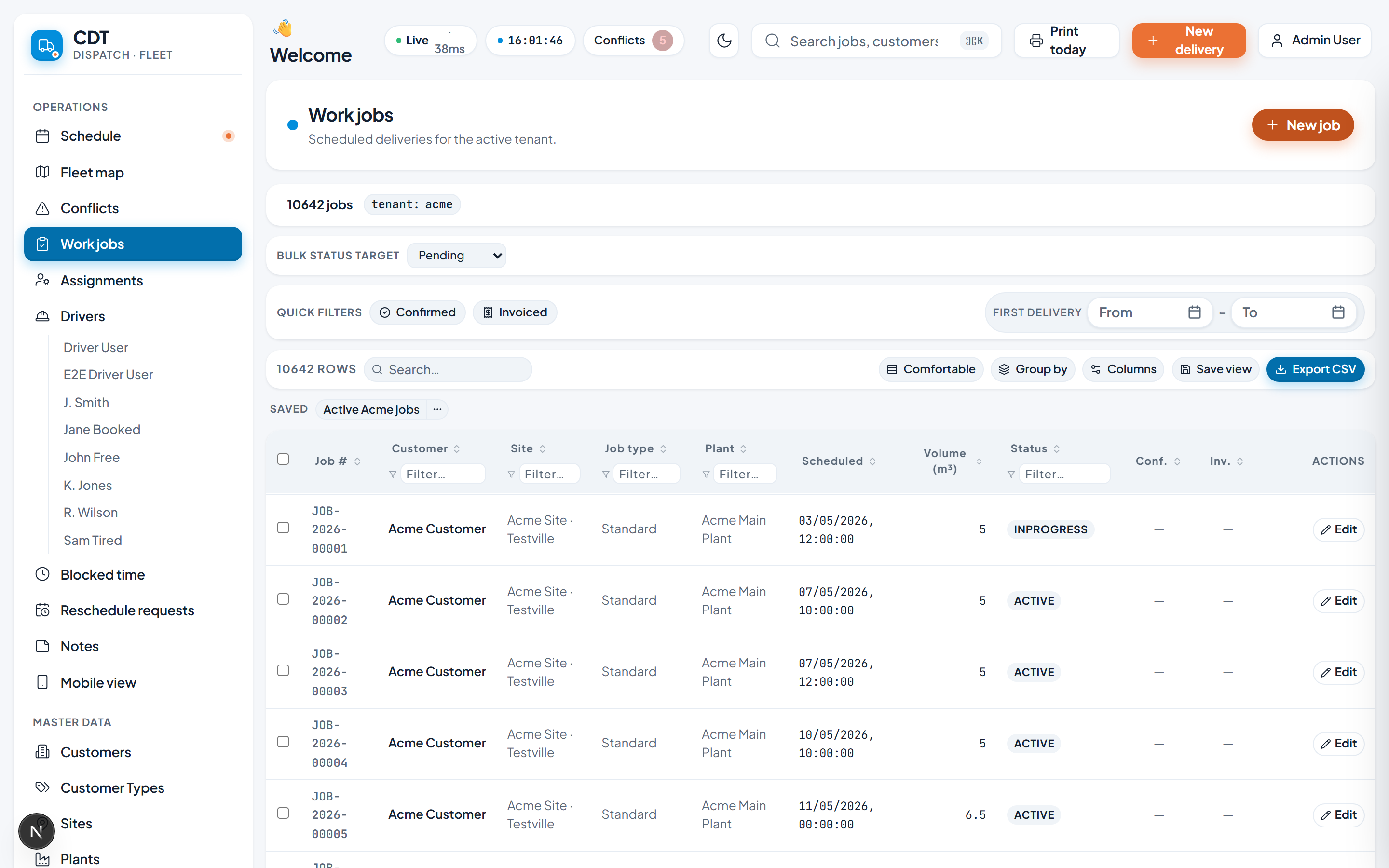
The everyday round trip — an order comes in, a truck goes out.
1. Take the order
Someone rings wanting concrete. Type in who they are, how much they need, the mix and where it's going. That's it — it's saved.
Step 1 of 4 · these are real screens from the system
Start small, then unlock the team when you need it
Sole Trader is half the Standard price for a one-person account. It keeps the Standard feature set, but the owner is also the operative, driver or workforce user for their industry.
A one-person account for owner-operators. Locked to one user, who is also the workforce user.
The same Standard tier without the one-person account lock, for businesses that need a team using the system.
It's still taking shape — and we want your input
We're building this around real, independent concrete yards right now, and it isn't on general sale yet. So we're genuinely open to feedback: tell us what works, what's missing and what would make it a better fit for a yard like yours, and it helps shape where we take it next.
We're especially keen to hear about:
- How you take orders and price your jobs today
- The words you use for your mixes, trucks and job types
- The one report you actually look at each week
- Anything you'd never use and would rather not see
- 1You tell us in plain English
“We always need a second driver on big pours” — that’s enough. No tech words needed.
- 2It goes straight to the people building it
Your feedback lands with the team developing the system — not into a black hole or a ticket queue.
- 3It helps steer what comes next
The more yards raise the same thing, the higher it climbs the list. Coming in early means a real say in that.
You won't be left to figure it out
We set up a demo for you
We pop in some example trucks, customers and a day of deliveries so you can see it working — not a blank screen.
You have a play
Log in from the link in your email and click around. Break it, poke it, see if it makes sense. No commitment.
We make it yours
Like it? We set it up with your real yard, your trucks and your way of working — and tweak whatever you need.
Straight answers
I'm not really a computer person. Is this going to be a nightmare?+
No. If you can use a smartphone, you can use this. It works like a whiteboard you drag things around on. And we set the whole thing up for you first — you're not staring at an empty screen wondering where to start.
Do my drivers need fancy phones or new kit?+
No new kit. Drivers use the phone that's already in their pocket. You use whatever computer, laptop or tablet you've got in the office. Nothing to install.
We do things our own way. Will it handle that?+
It already covers how most concrete yards run day to day. It's still in development, so we can't promise every last detail — but we're genuinely keen to hear how you work, and the things that matter most to yards like yours are exactly the feedback we want at this stage.
Is our information safe?+
Yes. Your yard's data is walled off in its own private space — only your people can see it. Nobody else's business can see yours, and yours can't see theirs.